Agent Platform V1
What?
The Rafmer Agent Platform, the product layer on top of the Agent Infra. A B2B AI-powered workflow platform, complete with a chat interface for building automation workflows and a flow visualizer. The platform was infrastructure-agnostic, hostable on single- and multi-node Kubernetes clusters and deployable as a managed service.
The workflows ran on schedules, triggered by APIs or the chat. It had integrations for per-user distributed S3-compatible storage, available through RAG, the API, and a drive-like interface. The system came with a built-in Postgres database (self-hosted Supabase), with row-level security, exposed through PostgREST and an auth gateway. Workflows were built on demand through the chat and issued to a cluster-based agent, streaming the built workflow steps one by one. The workflow agent was capability-aware, meaning it could utilize the embedding, database, S3, and LLM services made available by the cluster. Workflows themselves were powered by an Airflow backend, with user scoped access permissions. Permissions, users, files, and workflow scoping were handled by the separate auth and user system, made available on a per-cluster basis.
Why?
The Agent Platform v1 was Rafmer’s core product, built upon integration gaps we were seeing across the AI-chat and SaaS markets at the time (2024 / 2025). Code had to be copy-pasted in and out of ChatGPT, and local inference was horribly optimized. This was before Harnesses, MCPs, Chat plugins and in the early days of RAG and context engineering, meaning any LLM-powered product meant API + manually written flows. No-code workflows were also flourishing at the time, with n8n outpacing its “enterprise” equivalent, Zapier, not yet married with AI.
In the early days, Rafmer was conceived as a content platform and technical consulting firm, where we used the above tools extensively in our work. As time went by, we automated workflows using plain Python (SEO, blog posts, socials, etc.), built in part by ChatGPT and triggered manually. Every time we wanted something new, we’d start the same repetitive flow of prompting with requirements, copying the code, fixing bugs, hooking up our data, and writing a shell wrapper. We wanted to build a system dedicated to building, validating and deploying automation workflows on demand, able to integrate directly with our data and other systems. I designed a PoC meta-script, and it became apparent that if properly standardized, this was something a local model could handle, and if integrated with no-code approaches, it meant non-technical people could get the same benefit. Initially I started dabbling in local models to give blog posts and copy a unique voice. At the time, the 12B Llama2 was not good enough for that, neither in speed nor quality. But what they were good at, was generating code snippets; all we had to do was bring them together.
Our initial design attempted to solve the following problems:
- Non-technical friendly, through no-code visualization and AI generation
- Unified build + deploy through templating and Docker-based workflow tasks
- Reusable flow steps through plain Python scripts within a container runtime
- Future-proofing and minimizing the data-related attack surface through local infra + AI
- Minimize cost by running the container runtime, central database, and AI fully locally
When this design came together and the bigger picture was clearer, our product (from a market context) was useful, competitive with comparable SaaS products, and the sort of offering that was missing in the “pre-agent world”. We decided to productize into these angles targeting SMBs:
- Agent Platform: A SaaS-based Managed Service.
- Edge Node: Horizontally scalable nodes, dedicated to running the service on-prem.
These products would give customers extensive automation capability with the option to claim full end-to-end ownership of the stack.
How?
Initially I built an internal compute cluster for Rafmer to serve as our tech infrastructure, product demo, and SaaS entrypoint. Each feature as its own microservice, Kubernetes-deployable with a clearly scoped responsibility. All coming together as a clearly unified API, accessible via usage-scoped API keys for subsystems and client-facing deployments, and JWT tokens for UI users, allowing API access out of the box.
k3s
Kubernetes YAML, Helm, and its underlying pod-based runtimes are the standard declarative way to build durable services. Most Kubernetes runtimes also support horizontal scaling through clustering, and vertical scaling through deployments. Although seemingly overengineered, Kubernetes gave us optionality for bare-metal, cloud, and hybrid deployment modes. k3s is a favorite edge and IoT Kubernetes distro that’s simple to install and scale, has core services bundled, and thus perfect for minimal effort install+maintenance. Each of our nodes runs the k3s agent, exposed through kubectl and Rancher, letting us easily deploy new services and provision jobs. More on the cluster build-out here.
Supabase
Every multi-tenant product needs auth, a user database and file storage, but none of those were what made the platform interesting. Being two people, every week I spent rebuilding commodity services was a week not spent on the workflow agent, so here I chose to buy rather than build. The catch was that it still had to run on our own infra, otherwise the whole local-first angle fell apart.
Supabase ticked those boxes. It’s an open-source bundle of Postgres, PostgREST, auth and S3-compatible storage, and it can be self-hosted on the cluster next to everything else. What we got out of it:
- Per-user data isolation enforced by the database itself through row-level security, not something I had to remember to check in application code.
- A REST API over Postgres out of the box through PostgREST, which the gateway could route straight to.
- JWT-based auth across the platform, so the same token scoped a user’s database rows, storage buckets and workflows.
- The same stack regardless of deployment mode: self-hosted on the Edge Node for on-prem customers, and on our cluster for the managed service.
The Rafmer-specific parts (Airflow isolation, the workflow agent and the gateway) I built in-house, more on those below.
Airflow
To run our workflows, we needed a service that supported anything from small API calls to demanding data pipelines. We needed to be able to easily debug it locally, as well as have flexible deployments across on-prem and cloud environments. Something that could have its resource demands constrained and run in isolated environments on a per task basis.
As a catch-all, I landed on Airflow as the workflow orchestration system. Airflow is an industry standard for scheduled data-transformation work, with built-in Kubernetes and plain standalone support, where tasks and DAGs (workflows) are defined pythonically. This instance was deployed using the default Helm chart with extensive custom values.
Mapping the necessary values of the chart was a non-trivial task. A Kubernetes-based Airflow deployment consists of six services:
- A metadata database
- A DAG Processor
- A scheduler
- An API-server
- A top-level worker orchestrator
- The underlying worker container running the task
All of these had to be configured individually through Helm-templated environment variables to work with the workflow syncing, environments, persistent storage, and our authentication system. Safe to say, it’s not something you just deploy and leave, you needed to understand the requirements at each level of Airflow and translate Airflow env variables into the relevant Helm variables, aligned with the Airflow version you were running.
On top of that, Airflow has a lot of boilerplate, made worse by Kubernetes as the deployment mode. There’s also not a very clear Pythonic way to inject code with runtime-defined arguments without it being injected as text, a standard templated argument, or read from disk.
For reference, this is what a single containerized task looks like in plain Airflow. Arguments go in as raw strings and get parsed from sys.argv inside an inline script:
KubernetesPodOperator(
    task_id="say_hello",
    namespace="airflow",
    image="python:3.11-slim",
    env_vars={"ENVIRONMENT": "production"},
    container_resources=k8s.V1ResourceRequirements(
        requests={"memory": "512Mi", "cpu": "500m"},
        limits={"memory": "1Gi", "cpu": "1000m"},
    ),
    cmds=["python", "-c"],
    arguments=[
        "import sys; print(f'Hello {sys.argv[1]}, running for {sys.argv[2]}')",
        "John Doe",
        "{{ ds }}",  # Airflow Jinja macro for the execution date
    ],
)
The newer TaskFlow @task.kubernetes decorator takes native Python parameters instead, but you still end up writing DAG and container boilerplate for every single task.
Templating
To mitigate Airflow complexity and standardize the task entrypoints, I wrote a templating framework. From a dev/agent point of view, every task step was a regular Python script, running through main and taking in runtime arguments through said main method. The task templating acted as a runtime decorator, interpreting the main entrypoint, normalizing the arguments, and registering them with the central DAG instance so input arguments can be selected at the beginning of the full workflow. By treating each task as a plain Python script with a typed entrypoint (with defaults), debugging across environments and LLM-based generation became much simpler. In between runtime entrypoints and the Python script, log capture and artifact dumping are handled through the S3-compatible backend.
For the DAG building itself, there was a subclass extending the default Airflow DAG instance, setting a default runtime environment and injecting definitions from the template and handling default arguments. Another task wrapper (handling logs and storage) wraps around the script modules, pythonically imported to enable code traversal by the user and dependency understanding by the LLM. This task wrapper then constructs, names, and builds the task using function definitions within the DAG runtime environment and ensures correct arguments end up in their appropriate tasks. It’s not perfect, but this approach allowed me to simply template up a workflow importing plain python-scripts, push the code, and the DAG processor picks up the workflow with its environment, ready to go.
A user/agent-facing workflow definition: import the task tools, hand them to the templating framework’s build_dag, and wrap each into a task (enable_k8s renders it as a KubernetesPodOperator), with no Airflow boilerplate:
from airflow import DAG
from src.agent_tools.pipelines.common.dag_utils import build_dag, task

# import the tool(s) you want to use in the dag
from src.agent_tools.tools import tool_template


DESCRIPTION = "Describe the dag here"

# List all the tools you imported
tools = [tool_template]

# Dynamically build the dag-object based on provided tools, critical for correct arguments in the dag
dag = build_dag(tools, description=DESCRIPTION)

# Transform the tool into a task
tmpl_task = task(dag, tool_template, enable_k8s=True)

# Define the task-execution flow
tmpl_task
The task script itself: a plain Python main() where every typed argument (optionals with defaults) becomes a DAG trigger parameter, and thanks to the ToolUtil entrypoint, the same script runs standalone from the terminal:
import os
import shutil


# Main function goes here, any arguments will be translated to argparser or dag args, typing is a must
def main(arg_no_default: bool, arg_has_default=True):
    print("test")
    os.mkdir("test_folder")
    with open("test.txt", "w") as f:
        f.write("test")
    shutil.copy("test.txt", "test_folder/test2.txt")


# Allows us to call the tool from commandline
if __name__ == "__main__":
    from src.agent_tools.tools.common.base_tool import ToolUtil
    ToolUtil.run_main_w_argparser(main)
Allowing the underlying task scripts to be runnable from the terminal and from non-Kubernetes Airflow (plain python or docker) easily interpreted and synced to the workflow pool once deployed.
Because the templating layer normalizes each task’s typed main() signature and registers it with the central DAG instance, the arguments surface as first-class trigger parameters when the workflow runs, without touching any DAG code:
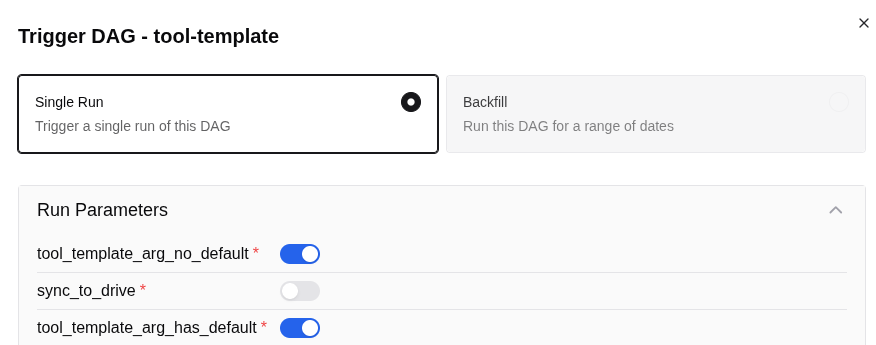
main() (required booleans, optionals with defaults) are surfaced automatically as run parameters; the workflow-agent and end users trigger workflows without editing DAG code.And the finished workflow lands in Airflow as any other DAG, with each templated script wrapped in its Kubernetes task:
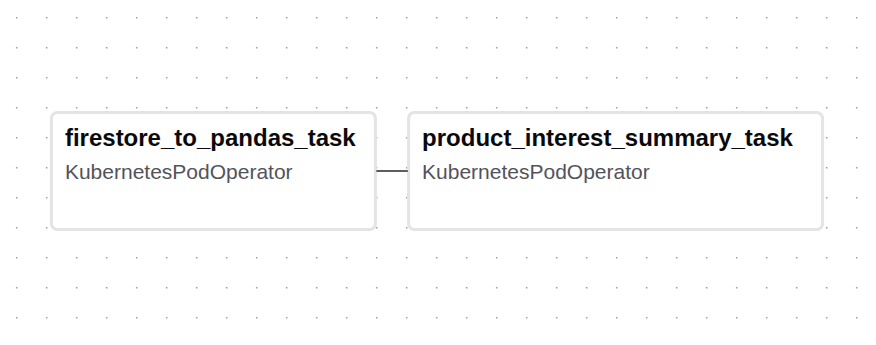
KubernetesPodOperator container.UI / Agent
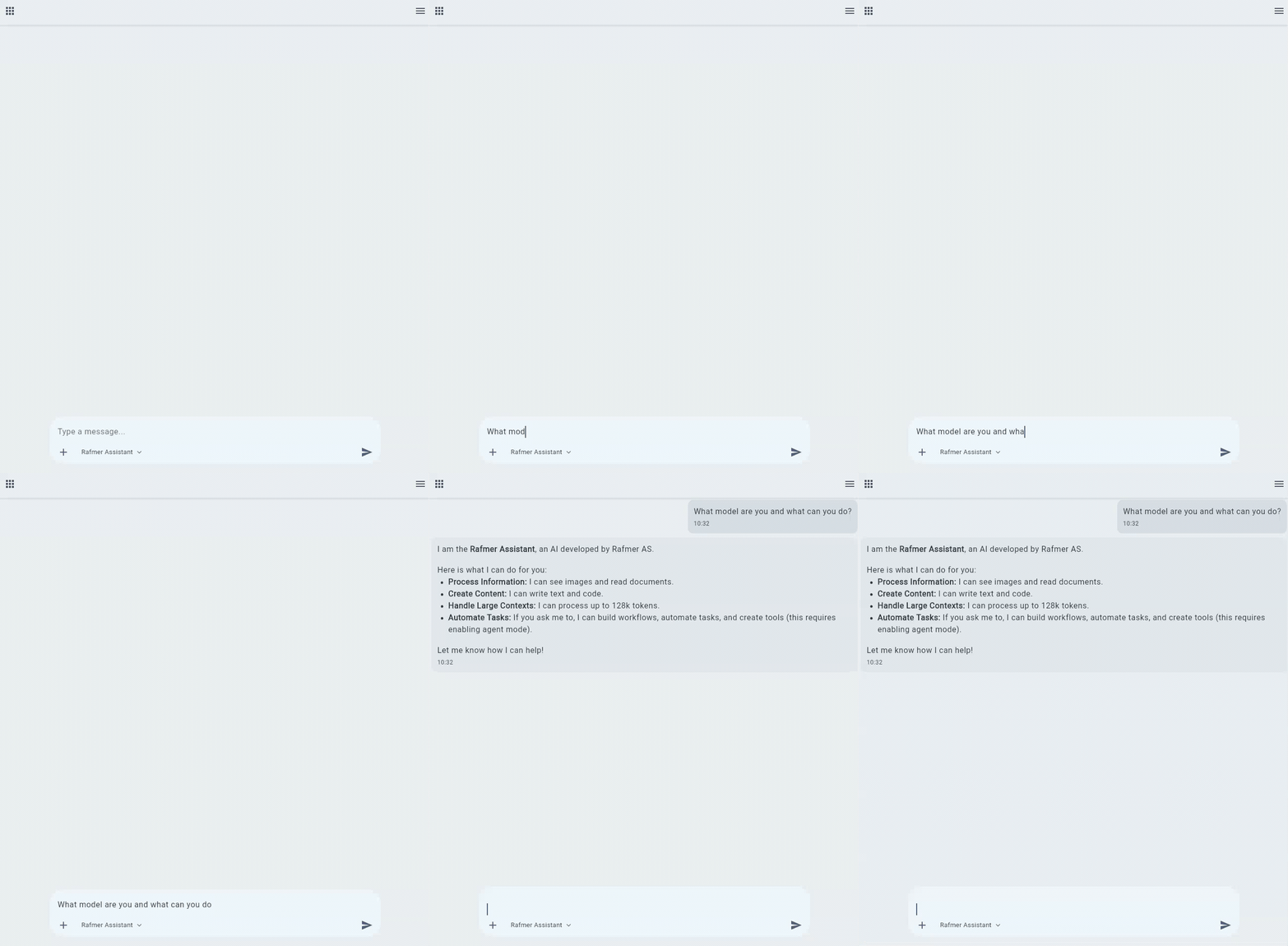
This all comes together into a chat based UI, interfacing with the workflow system, the workflow builder agent, data connectors through tools and MCPs and the inference backend.
Using /agent-commands and natural language, the user can iterate on the workflow and see it updated in real time. When a workflow is finished, it is synced with the overall DAG system and can be run from the Airflow UI or the proper UI tab. The workflow UI takes a page out of Zapier, simplifies a lot of the Airflow UX caveats, and displays filtered per-task logs. These logs are only those produced internally by the task.
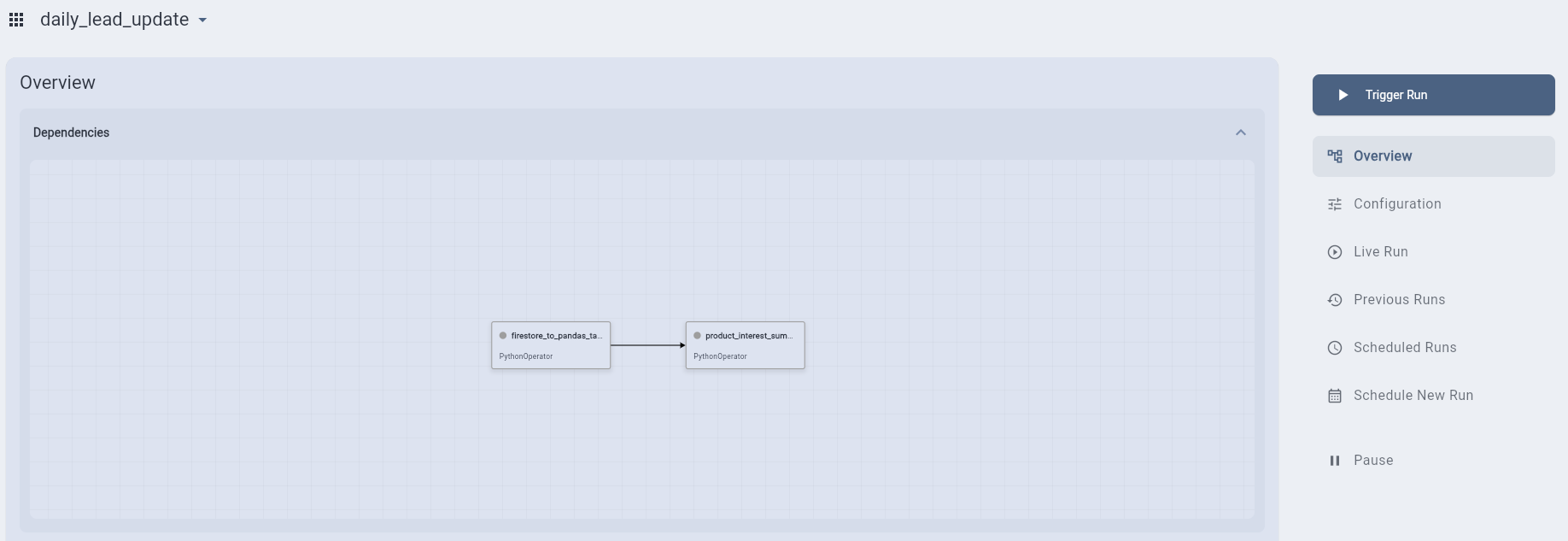
The UI exposes a user drive, accessible by the user’s chats and workflows, and with files chunked + indexed per user demand. It was built in Flutter to enable cross-platform releases.
Workflow Agent
Our workflow agent takes in queries through a Quart-based WebSocket server, parses commands into concrete actions, and executes the actions with rolling updates, asynchronously streaming them to the user.
The initial prototype was a simple pipeline around an LLM:
- Create workflow and task specifications
- Create a code skeleton based on templates
- Implement functionality task by task
- Stream a rolling update of the workflow for the UI to display
- Move state to editing once finished
For editing we used the underlying Python library for Aider, and quickly found this would give better results for the full generation pipeline at sufficient model quality (coding skills, tool calling, etc.) and context. Our original pipeline was an early dense model with questionable tool calling, doing a maximum of 30k context.
For the second iteration I wrapped the freer Aider calls in our state and server functionality, having a template aware back and forth to define requirements before triggering a more narrow “implementation”-state for aider. this mode implemented function by function on disk, with a narrower system-prompts to manage our context budget.
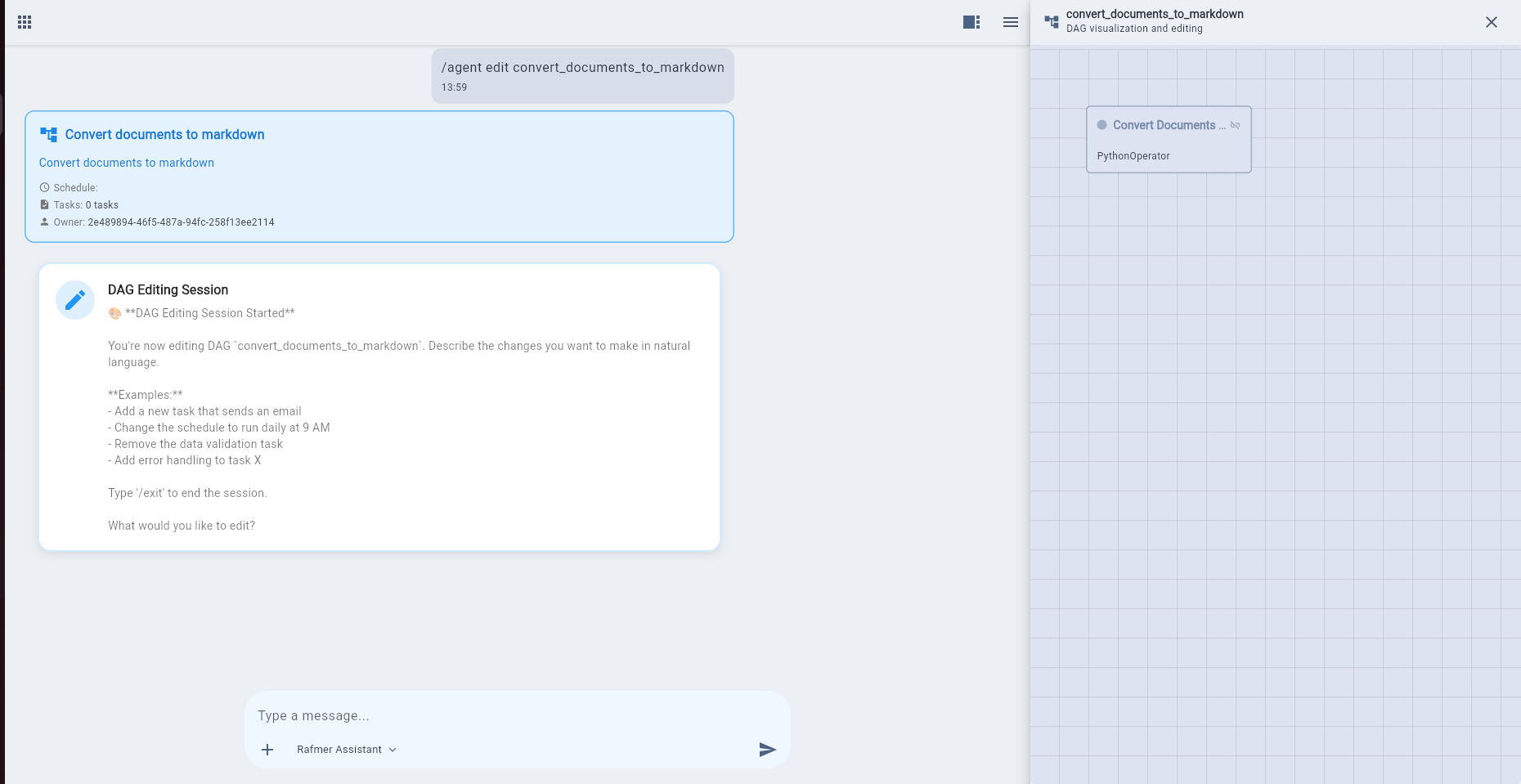
A full build from a single prompt, no manual steps in between:
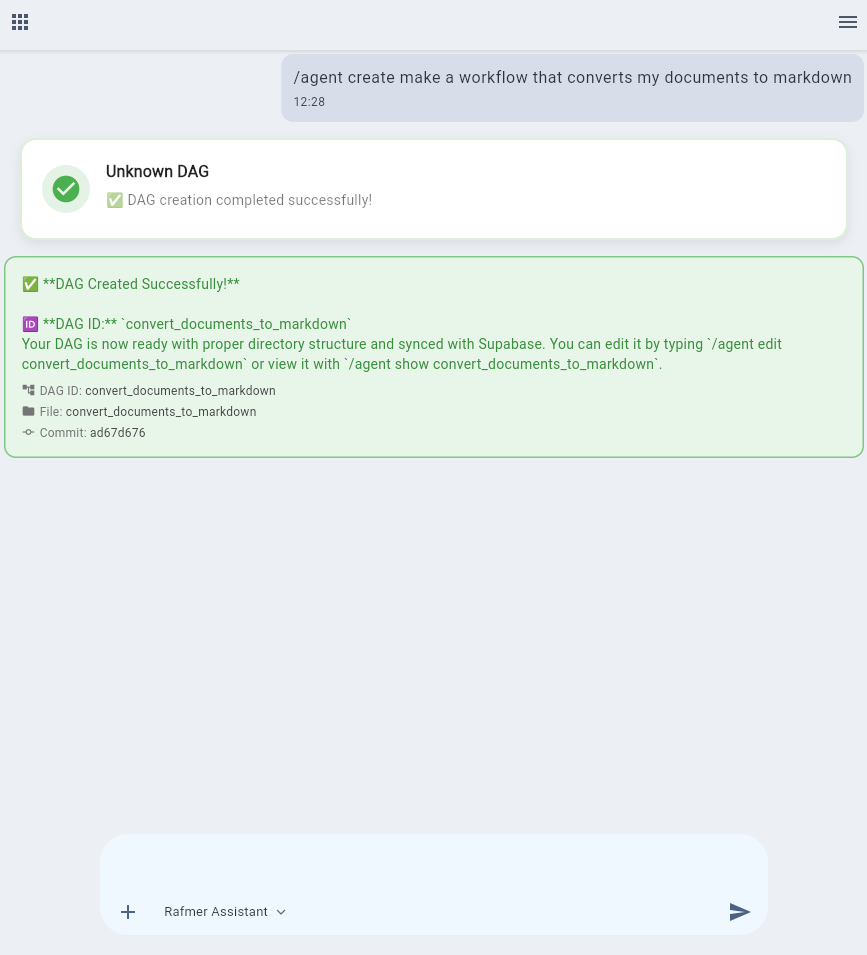
The DAG the agent actually produced for that build, following the same template structure as the workflow above:
from airflow import DAG
from src.agent_tools.pipelines.common.dag_utils import build_dag, task

# import the tool(s) you want to use in the dag
from dags.dag_edf4724d_f161_4ee0_8583_62266198d8ba.tasks import convert_documents_to_markdown


DESCRIPTION = 'Convert documents to markdown'

# List all the tools you imported
tools = [convert_documents_to_markdown]

# Dynamically build the dag-object based on provided tools, critical for correct arguments in the dag
dag = build_dag(tools, description=DESCRIPTION)

# Transform the tool into a task
convert_documents_to_markdown_task = task(dag, convert_documents_to_markdown)


# Define the task-execution flow
convert_documents_to_markdown_task
And that exact DAG as it lands in Airflow, registered and ready to run:
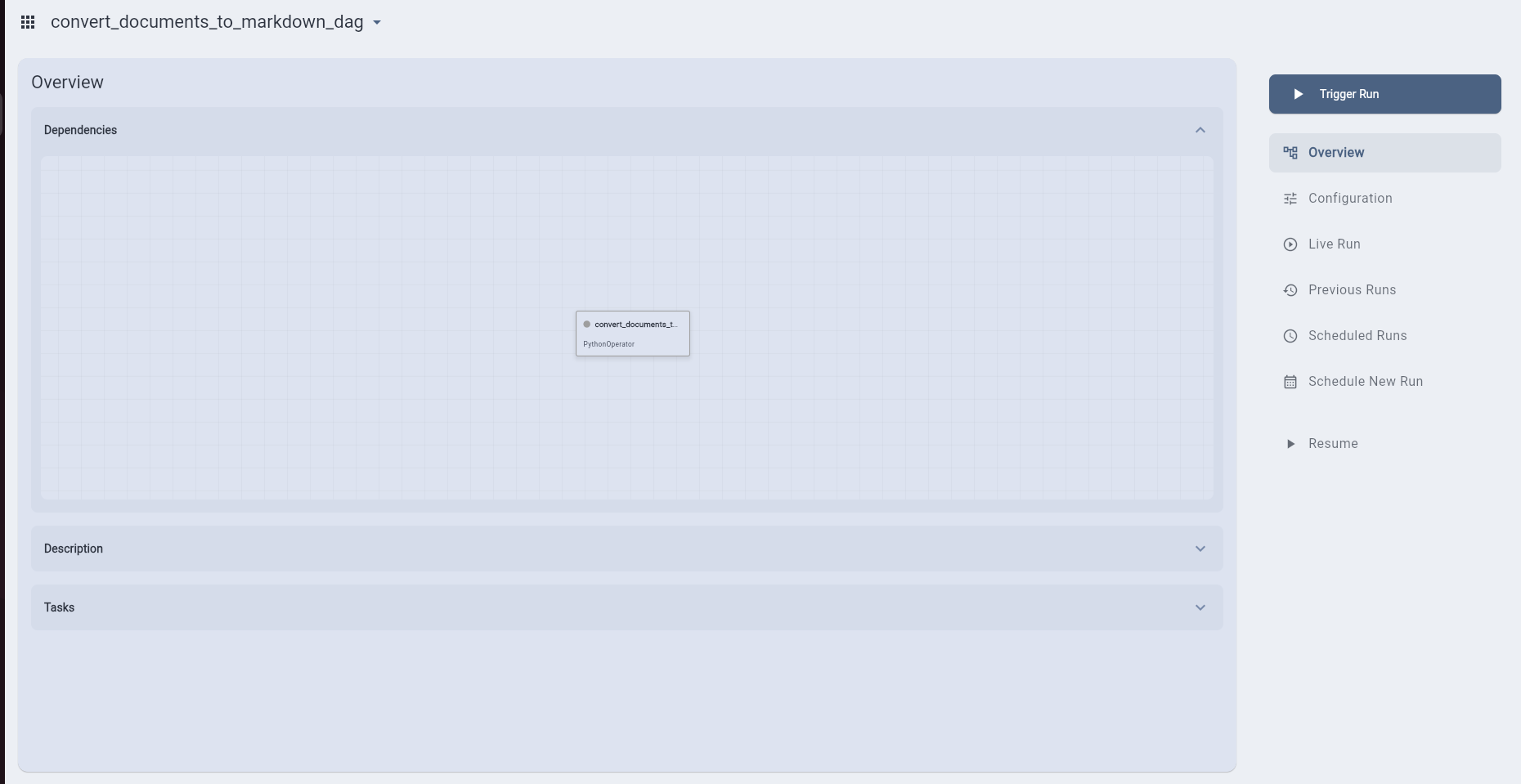
convert_documents_to_markdown DAG synced into Airflow's UI; the module from the code above (dag_edf4724d_…) registered as convert_documents_to_markdown_dag, picked up by the DAG processor and ready to trigger from the platform or Airflow.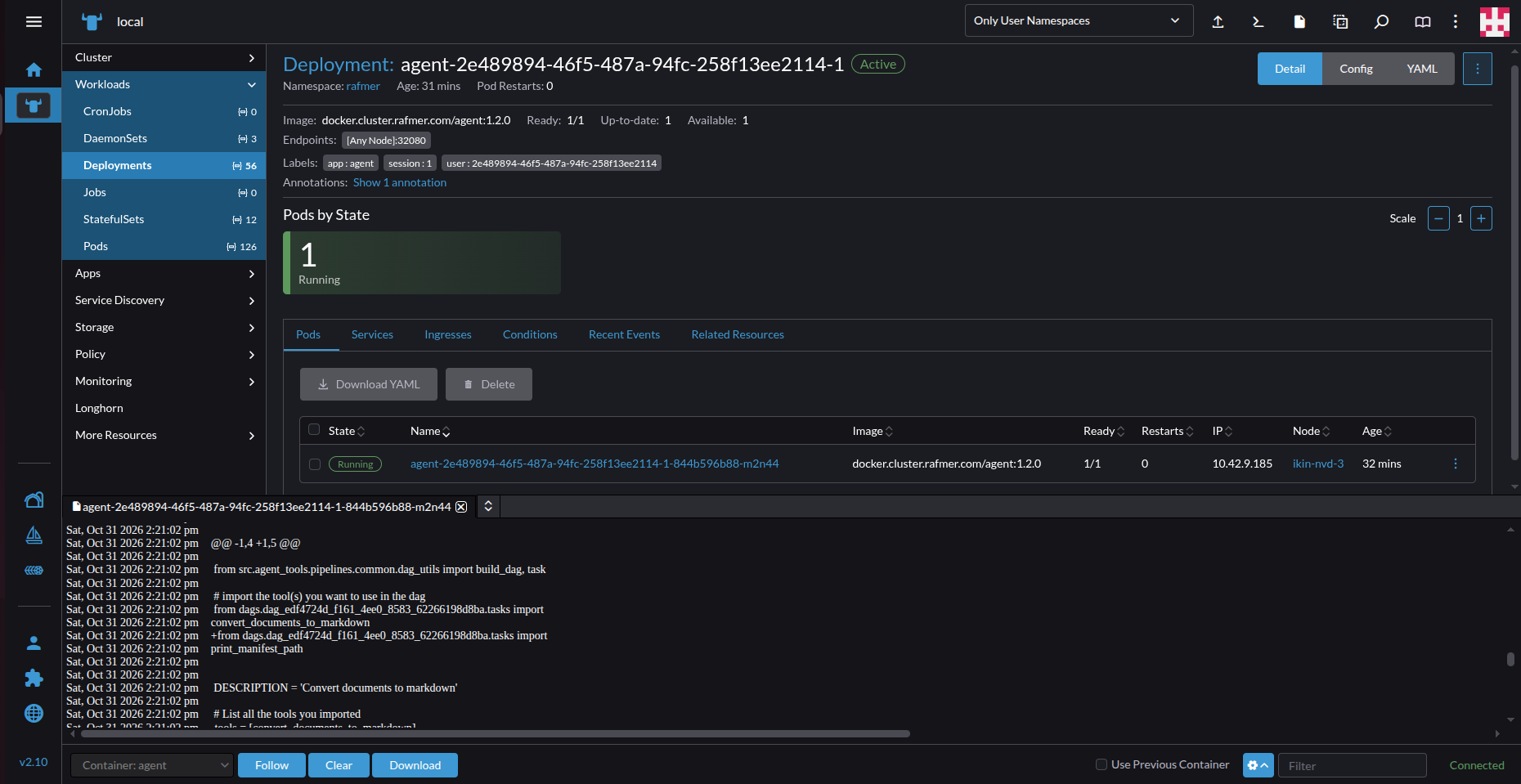
dag-task-runner deployment in Rancher pulling its image and provisioning pods on the k3s cluster; the same agent the UI talks to over the WebSocket server.Airflow Security
Completed workflows are then saved and synchronized with the full DAG repository, with the underlying code libraries (task implementations, etc.) synced to a user-scoped bucket.
The primary Airflow gap was that workflows (i.e. DAGs) could not have their code isolated on a per-DAG basis out of the box, beyond the standard admin, user, op, and viewer roles (in Airflow 3). Beyond that, access controls had to be defined directly in the DAG code, posing security issues where users could just arbitrarily claim admin. Another reason to abstract away DAG and task building.
As a solution to DAG access scoping outside of Airflow itself, we built an API layer interacting with the Airflow API and the authentication service, bridging the scoped auth gaps between workflow and user. The initial design involved a custom auth manager interfacing directly with the Airflow deployment, but this still required blanket roles for the user.
Just access-controlling triggering is not enough; we also need to handle user-scoped storage and authentication within the tasks themselves. Authentication is needed for the user to push and pull their artifacts and interact with data or LLM-based services, plus a workspace to dump those artifacts to begin with. The Kubernetes Airflow engine works by starting an orchestrator container that manages the lifecycle of the task run. No workflow-specific code is ever run here; it just sets up, submits the deployment, pipes logs, and watches the end state of the task. To inject a user-scoped workspace and pull the user environment from the authentication system, I built a custom package initializer, injected via Pythonpath to decorate the resulting deployment template with a runtime user PVC and the pulled environment variables. This way I was able to implement granular scoping of workflow access and isolate each runtime, without exposing the underlying system to anything user-driven, like code or environment.
Gateway
User-based scoping across the system comes together in a central API gateway, handling auth’d routing to User, Airflow, AI, Data, and storage backends. Combining and restructuring responses where necessary. This exposes all the sub-services as a single structured API, going hand in glove with the UI without exposing entire sub-service APIs, letting us have full control of our exposed surface. This approach also enables easy spin up of per-customer gateways with least-privilege access, with possible output response transformation to fit their requirements or expose client-specific data / services. It also meant customer-facing gateways could be exposed through cloud deployments or public gateways without direct entrypoints to our full API.
Results
The final product is an ambitious and flexible multi-tenant system, bridging gaps in applied OSS and synthesizing disconnected services into a unified experience. The platform can be deployed on any infrastructure supporting Kubernetes, and the UI runs natively on any device.
Architectural Achievements
The end result is a layered system of the following:
- Authentication and Storage: Full JWT tokens, key provisioning, and structured DB + S3-compatible storage
- LLM Services
- Airflow: Hardened access with user-isolated containers and data
- API-Gateway: Auth and Translator
- Customer facing gateways: least-privilege entrypoints for customer facing services
- Agent Runner: dynamic job for the workflow-agent
- UI: Brings the disconnected services together in a platform agnostic app
What we haven’t built
Although the system covers many gaps, some substantial ones still remain:
- Central DAG processor reads, interprets and executes arbitrary code across all of the DAGs. In the intended product this was contained by the deployment model: each customer got their own cluster through the Edge Node, or for the managed service, their own namespace with a separate instance of the platform’s subservices, so the DAG processor only ever parsed that customer’s code. Running a shared multi-tenant cluster would need per-tenant DAG processors or sandboxed parsing first.
- Users can’t add custom environment variables and lack the in-agent support required.
- Moderation layers, the model should flat out refuse adversarial requests (more on that below).
- Egress / Ingress controls: adversarial traffic and other network-based abuse have no controls.
Product Caveats
In order to pass the enterprise / B2B sales bar, you should have SOC2, ISO27001, and be GDPR compliant. Although GDPR-compliant and designed with security in mind, the business and system have not formally passed either certification. More problems can arise from licensing out the software, especially if used maliciously. In the context of the EU AI Act, a forward-deployed cluster or user automation could potentially violate rules regarding High-Risk Systems (like a CV screener), General-Purpose AI (copyright compliance), and Limited Risk Systems (unlabeled AI ads), and hold the vendor (i.e. Rafmer) liable, since we also own the software layer. Common mitigations are moderation or output filters, but a technically malicious actor could easily bypass these if they have the technical ifra on site. Any mitigation involving per-cluster around-the-clock monitoring would cost resources and be counter to the sovereignty angle of the customer owning the infra.
Current State of the Product
Today the project has been shelved, due to breadth of complexity and changing hardware and agent markets. We are able to run a much simpler business with less finanical, security, compliance and liablity risks by moving to agent platform v2. The underlying agent is built with an older harness with limitations targeted for models over a year old, and current agent harnesses will likely do a better job. Today, scheduled “workflows” are built into most providers and agent harnesses whilst being much more flexible than our approach.
Throughout its stable lifetime it served two production workflows utilizing our full llm, data and compute infra end-to-end. These were for an external customer, utilizing a customer specific gateway. Further details are omitted due to NDA.